How to deliver a reader magnet with ActiveCampaign
· 5 min read
ActiveCampaign is known for powerful automations, which makes it a good fit for authors who want to send new readers a carefully planned series of emails. This guide connects it to Storyfinch so every reader who picks up your free book is added to an ActiveCampaign list, ready for your welcome automation.
What you need
- An ActiveCampaign account. ActiveCampaign has no free plan, but offers a 14-day free trial.
- Your reader magnet as an EPUB, a PDF, or both, plus a cover image.
- Storyfinch Pro for the automatic connection. On the free plan you can download your new readers as a spreadsheet and import them into ActiveCampaign yourself.
Step 1: Create a list
In ActiveCampaign, go to Contacts → Lists and click Add a list. Give it a name readers will recognise (contacts can see list names), add your website address in the List URL field, which ActiveCampaign asks for, and save it. Storyfinch adds each reader's email address and, if they gave it, their first name.
The Starter plan allows five lists, so many authors keep one main list and use a tag or automation to tell readers from different books apart.
Step 2: Find your API URL and key
ActiveCampaign needs two things from you: your account's API URL and an API key.
- Click the Settings (gear) icon, then Developer.
- Copy the API URL. It looks like
https://youraccount.api-us1.com. - Copy the Key shown underneath.
Each user in an ActiveCampaign account has their own API URL and key. Use the account owner's, or a user who will not be removed: if the user whose key you used is ever deleted, the connection stops working.
Step 3: Connect ActiveCampaign in Storyfinch
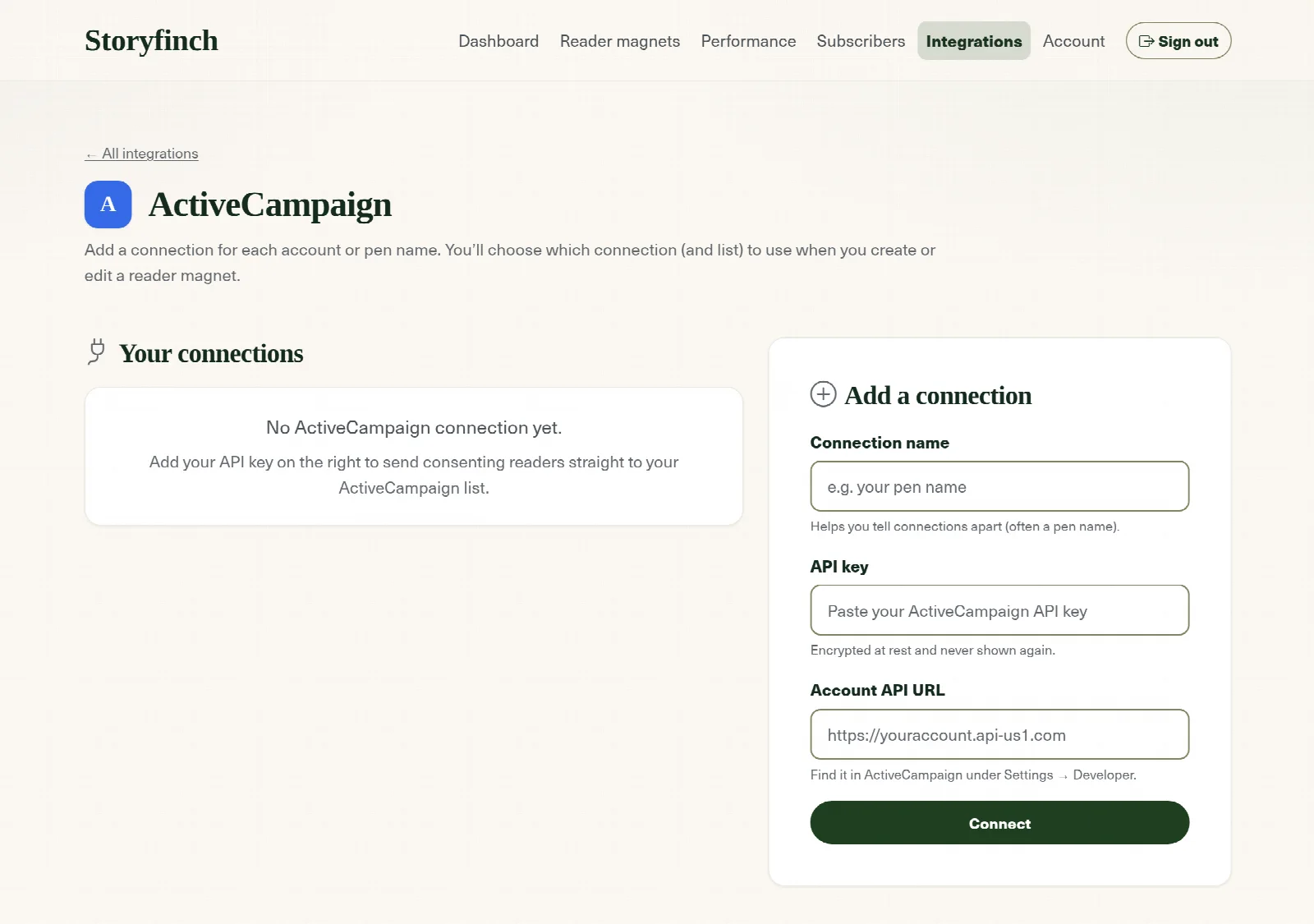
In Storyfinch, open Integrations, choose ActiveCampaign, and add a connection. Name it (your pen name works well), paste the API key, and paste the API URL. Storyfinch checks them straight away and stores the key encrypted.
Step 4: Choose the list for your reader magnet
In your reader magnet's settings, under the mailing list options, pick your ActiveCampaign connection and the list from step 1. Every reader who signs up and agrees to join your list is then added to it. If they are already a contact, their existing contact is updated rather than duplicated.
Readers are added as active subscribers straight away, because they have already agreed on your Storyfinch signup page and Storyfinch keeps a record of exactly what they agreed to. Readers who do not tick the box to join are not sent to ActiveCampaign. If you want readers to confirm their address before they get the book, switch that on in Storyfinch. See single vs double opt-in.
Step 5: Start a welcome automation
Storyfinch delivers the book, so ActiveCampaign handles what comes next. Create an automation with the Subscribes to a list trigger, choose your reader magnet list, and add your welcome email. This is where ActiveCampaign shines: you can follow up with a short series, tag readers by book, or branch on what they open.
Then test it: sign up on your own Storyfinch page with an address you can check, and confirm that the book arrives from Storyfinch and the automation starts in ActiveCampaign. Our welcome email sequence guide has an outline you can adapt.
ActiveCampaign's plans
ActiveCampaign has no free plan, but you can try it for 14 days without a card. As of October 2026, its cheapest plan, Starter, costs $19 a month ($180 a year, or £16 a month in the UK) for up to 1,000 contacts, and includes automations of up to five steps, which is plenty for a welcome sequence. Higher plans add unlimited automation steps and more. Check ActiveCampaign's pricing page for current figures.
If you are just starting your list and want a free email service, MailerLite, Brevo and EmailOctopus all have free plans that work with Storyfinch.
Frequently asked questions
Where do I find my ActiveCampaign API URL and key?
Settings (the gear icon) → Developer. Copy both the API URL, which looks like https://youraccount.api-us1.com, and the key.
Why did my ActiveCampaign connection stop working?
The most common reasons are that the key was reset in ActiveCampaign, or the user whose key you used was removed from the account. Reconnect with a current key from Settings → Developer. Storyfinch checks connections daily and emails you if one stops working, so readers are not lost in the meantime.
Does ActiveCampaign have a free plan?
No, but it has a 14-day free trial. The cheapest paid plan is Starter. If you want a free email service, MailerLite, Brevo and EmailOctopus all work with Storyfinch.
Will readers get an ActiveCampaign confirmation email?
No. ActiveCampaign sets double opt-in on its own signup forms, and Storyfinch adds readers who agreed on your Storyfinch page as active subscribers. Switch on confirmation in Storyfinch if you want readers to confirm their address.
Are readers who do not agree to join my list added to ActiveCampaign?
No. Only readers who tick the box to join your list are sent to ActiveCampaign. Storyfinch still records every signup and whether the reader agreed.
Grow your list with your next book
Give readers a free book and turn them into subscribers, with secure delivery and consent built in.
Create your free accountFree plan · No card required · Set up in minutes